 Skip to content

A year ago, we couldn’t have told you who Harry Mack was. Now we can’t stop talking about him, and it isn’t only because of the rapping.
Harry Mack is, in his own team’s words, “the world’s most electrifying freestyle rapper”, with over 2.5 billion views across his platforms, best known for Guerrilla Bars and Omegle Bars, where he builds verses on the spot out of whatever people throw at him. In July 2026 he played Rock Werchter, here in Belgium.
What really caught our eye was the screens.
How the crowd’s words get on the big screen
At a Harry Mack show, the words come from the audience. A screen like the one at the top of this page asks people to scan a QR code and send in a word, with their name.
Here’s what happens next, as Harry’s team described it to us. The answers land in a Google Sheet. Behind the stage screen sits a PowerPoint deck of 75 slides, each with a text box linked to one cell of that sheet. One refresh pulls every word in, and the deck runs on the big screen while Harry builds a verse around each one, live. Nobody types a single word.
That’s the whole trick: a form, a sheet, and a presentation that reads the sheet instead of being typed by hand.
How you’d build the same thing with INSYNCR
You don’t need a festival to need this. A quiz night, an awards evening, a town hall where questions come in from the room, a trade show stand that shows who just signed up: it’s the same pattern. Here’s how it goes in INSYNCR.
- Collect the answers in a sheet. Any form that writes to Google Sheets or Excel will do.
- Connect PowerPoint to the sheet. Google Sheets is a source from the Business plan up; Excel works on every plan.
- Design one slide, not seventy five. Put a text box for the word and one for the name, and link each to its column.
- Let Snapshot make the rest. Snapshot builds many slides from one template, one per row, so 75 answers become 75 slides without copying anything.
- Refresh, then run the slideshow. One click refreshes the whole deck with whatever came in last.
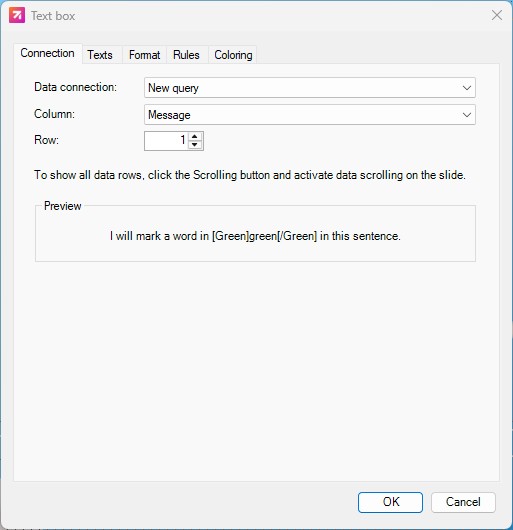
Change the design once and every slide follows. Add ten more answers and you get ten more slides.
If your data lives in Excel, this is a good place to start: how to create PowerPoint slides from Excel automatically.
The bit we liked most
We build software for people who make reports. It’s easy to forget that the same idea, slides that read their data instead of being retyped, works just as well in front of a festival crowd as in a board meeting.
Watch Harry Mack: YouTube · LinkedIn · harrymackofficial.com
Got slides you rebuild by hand? Start a free 7 day trial and link them to your data in an afternoon.