 Skip to content





What's inside the client review template?
Thirteen 16:9 slides. Every chart and table is a native PowerPoint object you can edit, and every slide has speaker notes that explain what goes there.
| # | Slide | What it shows |
|---|---|---|
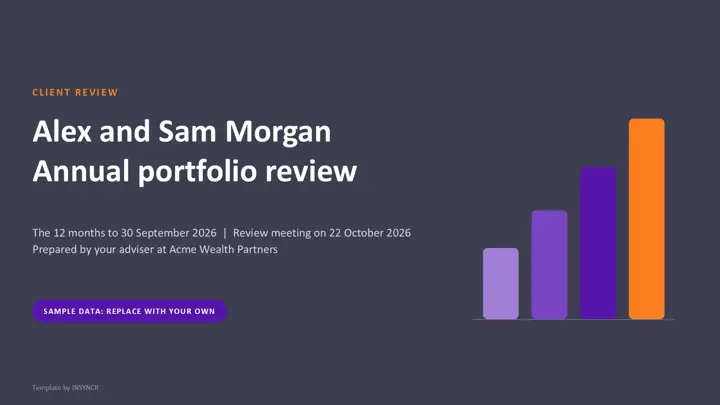
| 1 | Cover | Client, period, meeting date, your firm |
| 2 | Agenda | Ten parts of the meeting with a time for each |
| 3 | The year at a glance | Value, return after all fees, objective, three plain lines |
| 4 | Portfolio summary | Opening value to closing value line by line, plus a quarter end value chart |
| 5 | Performance against objectives | Returns against the objective over three periods, each objective with a status |
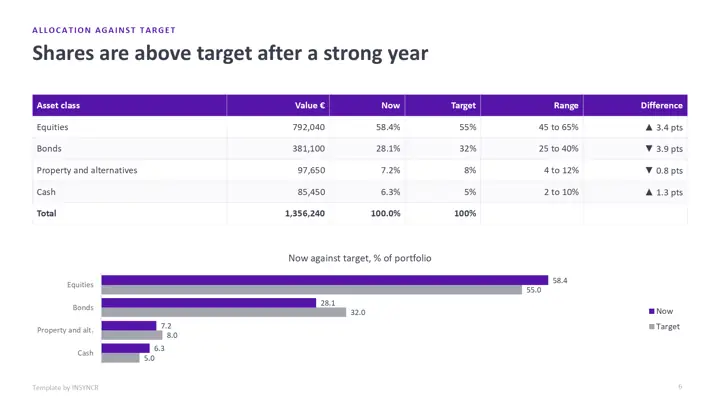
| 6 | Allocation against target | Table and chart of each asset class against its target and range |
| 7 | Transactions | Every money movement and trade in the period |
| 8 | Fees and charges | Each cost as a rate and in euros, deducted or inside fund prices |
| 9 | Changes in your circumstances | What's on file and a column to fill in during the meeting |
| 10 | Your plan for next year | Three proposals, each linked to an objective |
| 11 | Actions and next steps | Action, owner, date and status |
| 12 | Important information | How the figures are calculated and a disclaimer placeholder |
| 13 | Keeping it current | How to refresh it by hand or automatically |
The sample clients are Alex and Sam Morgan and the adviser is Acme Wealth Partners, all fictional. Every figure is made up, and the disclaimer is a placeholder for your compliance team's wording.
How do you use the template by hand?
- Download the file and open it in PowerPoint.
- Export the valuation, transactions and fees for the client from your platform.
- Fill in the portfolio summary first. Opening value, money in and out, growth and fees must add up to the closing value.
- Update the allocation, transactions and fees tables, then each chart: right click it, choose Edit Data, and paste your figures.
- Rewrite the titles, the plan and the actions for this client, replace the disclaimer, delete the sample labels and save a copy per client.
The first pack takes an hour or two. The catch is that you do steps 2 to 4 again for every client, every review.
How do you wire it to live data with INSYNCR?
If your client figures already live in an Excel workbook or a SQL Server table, you can link the pack to them once and refresh it for each client instead of retyping. INSYNCR does this from inside PowerPoint.
- Install INSYNCR. It appears as a tab in the PowerPoint ribbon.
- Select a chart, table or number on a slide and link it to the matching cells in Excel or the matching query in SQL Server.
- Before each review, pick the client and refresh. The charts, tables and numbers update in place, and you only write the plan and the actions.
The template's charts and tables are native PowerPoint objects, so links attach without rebuilding any slide. INSYNCR runs in PowerPoint on Windows (Office 2016 and later), not on a Mac or in the browser. Excel works on every plan; SQL Server needs the Professional plan.
Start a free 7 day trial No credit card.
Questions about this template
What should a client review pack include?
The usual contents are a portfolio summary, performance against the client's objectives, allocation against the agreed target, transactions, a costs and charges summary, any changes in the client's circumstances, the plan for the next period and the agreed actions. This template has a slide for each, in that order.
How is the return in the template calculated?
It's money weighted (modified Dietz) and after all fees, so it reflects when money went in and out. The method is written on the important information slide; if your platform uses a different method, change that text to match.
Is the client review template really free?
Yes. There's no form, no sign up and no watermark beyond a small "Template by INSYNCR" line in the footer, which you can delete. You can use it with your own clients.
Does the template work in Google Slides or Keynote?
It opens in both, but the native charts may turn into static pictures, so editing the numbers is easiest in PowerPoint. Live data linking with INSYNCR needs PowerPoint on Windows.