 Skip to content



What's inside the sales pipeline review template?
Fourteen 16:9 slides. Every chart and table is a native PowerPoint object you can edit, and every slide has speaker notes that explain what goes there and how to read it.
| # | Slide | What it shows |
|---|---|---|
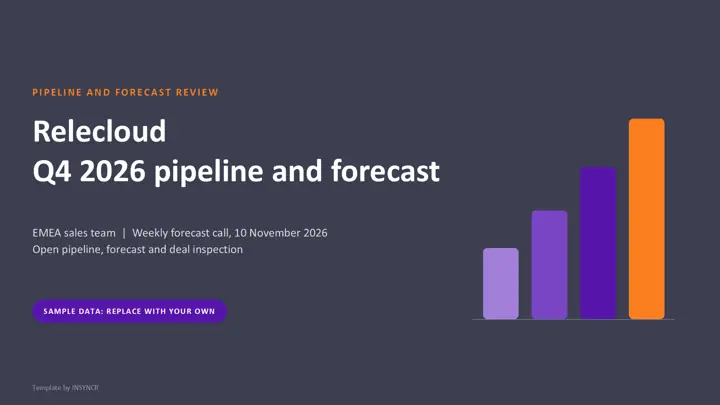
| 1 | Cover | Team, period and date of the call |
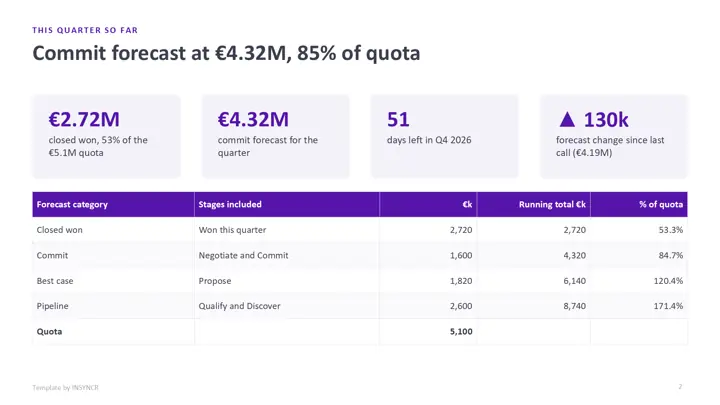
| 2 | This quarter so far | Closed won, commit forecast, days left, change since last call, forecast categories |
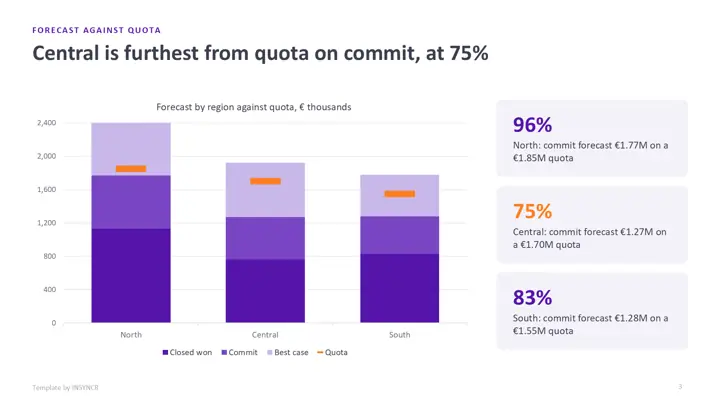
| 3 | Forecast against quota | Closed won, commit and best case by region, with quota markers |
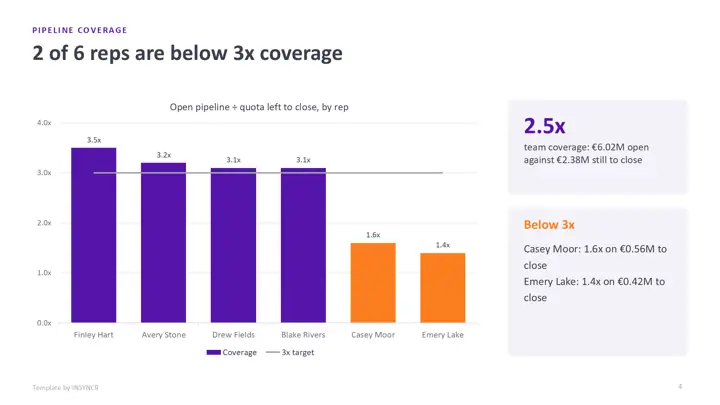
| 4 | Pipeline coverage | Open pipeline divided by quota left to close, by rep, against 3x |
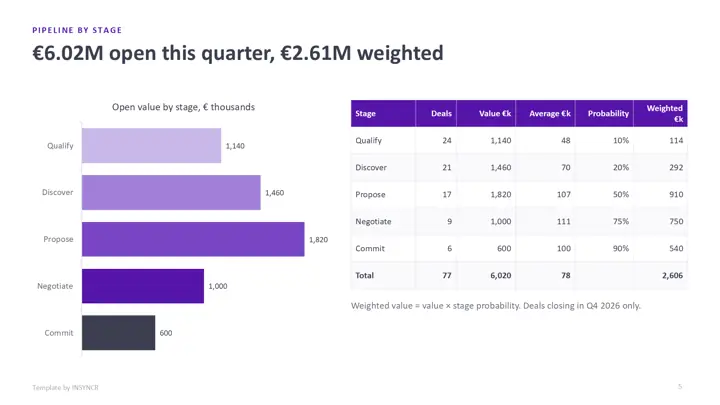
| 5 | Pipeline by stage | Deals, value, average deal, stage probability and weighted value |
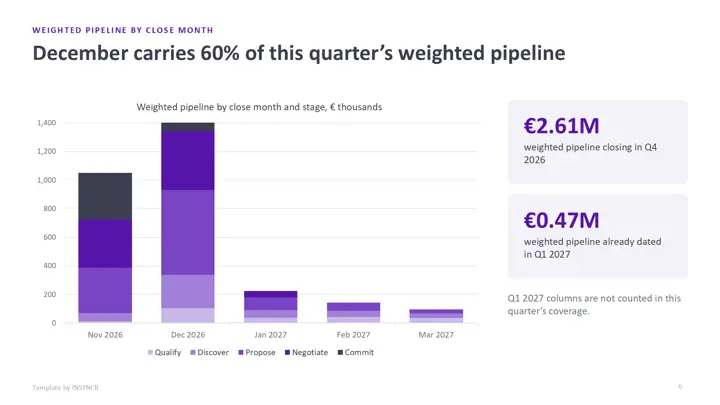
| 6 | Weighted pipeline by close month | Weighted value by month and stage, this quarter and next |
| 7 | Pipeline created | New pipeline per week against a weekly target |
| 8 | Top deals | The largest open deals with stage, close date, next step and risk |
| 9 | Slipped and stalled deals | What moved, why, and the recovery step |
| 10 | Win rate and deal metrics | Win rate, average deal size and cycle length by quarter |
| 11 | Rep leaderboard | Attainment, commit forecast, coverage and activity per rep |
| 12 | Renewals in the next 90 days | Annual recurring revenue up for renewal, health and next step |
| 13 | Actions and owners | What was agreed on the call, who and by when |
| 14 | Keeping it current | How to refresh it by hand or automatically |
Relecloud, its customers and its six reps are fictional, and so is every figure. Weighted pipeline is value times stage probability and coverage is open pipeline divided by the quota still to close, both computed from the same deal data. It's built for the internal forecast call; for a customer facing review, use the quarterly business review template instead.
How do you use the template by hand?
- Download the file in the colour theme you like and open it in PowerPoint.
- Export open opportunities closing this quarter from your CRM to Excel, with owner, region, stage, amount and close date.
- Build the totals by stage, region and rep, and paste them into each chart: right click it, choose Edit Data, paste the new numbers.
- Update the top deals, slipped deals, leaderboard and renewals tables from the same export.
- Reread every slide title against the new numbers, add the call's actions and save it as next week's starting point.
The first time takes a couple of hours. The catch is that a pipeline review runs every week, so steps 2 to 4 never stop.
How do you wire it to live data with INSYNCR?
If your CRM export lands in an Excel workbook, or your opportunities sit in a SQL Server view, you can link the review to it once and refresh it before each call instead of rebuilding it.
- Install INSYNCR. It appears as a tab in the PowerPoint ribbon.
- Select a chart, table or number on a slide and link it to the matching cells in Excel or the matching query in SQL Server. Linked tables can be filtered, for example to one region or one rep.
- Before each call, refresh. The forecast, coverage, charts and deal tables update in place.
The template's charts and tables are native PowerPoint objects, so links attach without rebuilding any slide. INSYNCR runs in PowerPoint on Windows (Office 2016 and later), not on a Mac or in the browser. Excel works on every plan; SQL Server needs the Professional plan.
Start a free 7 day trial No credit card.
Questions about this template
What should a sales pipeline review include?
Most reviews show closed won against quota, the forecast by category, pipeline coverage, pipeline by stage and by close month, new pipeline created, an inspection of the largest deals, slipped and stalled deals, win rate trends, a rep view and upcoming renewals, then actions. This template has a slide for each.
How is weighted pipeline calculated?
Each open deal's value is multiplied by the probability of its stage, for example 50% for Propose and 90% for Commit, and the results are added up. Agree the stage probabilities with finance once and keep them fixed, so the weighted number only moves when deals move.
Is the sales pipeline review template really free?
Yes. There's no form, no sign up and no watermark beyond a small "Template by INSYNCR" line in the footer, which you can delete. You can use it inside your own company.
Does the template work in Google Slides or Keynote?
It opens in both, but the native charts may turn into static pictures, so editing the numbers is easiest in PowerPoint. Live data linking with INSYNCR needs PowerPoint on Windows.