 Skip to content



What's inside the investment committee memo template?
Fourteen 16:9 slides. Every chart and table is a native PowerPoint object you can edit, and every slide has speaker notes that explain what goes there and how it connects to the deal model.
| # | Slide | What it shows |
|---|---|---|
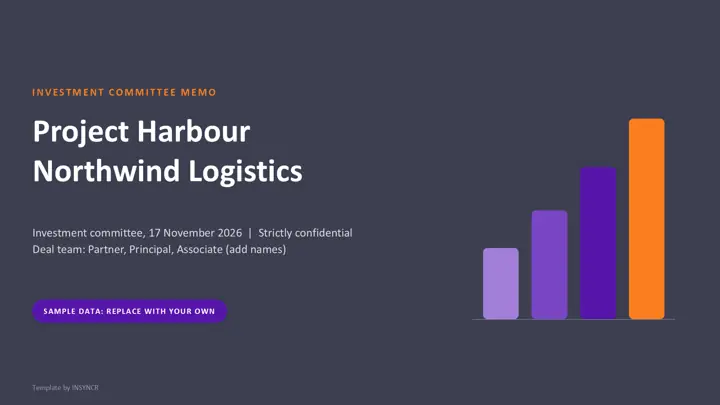
| 1 | Cover | Project name, target, committee date and the deal team by role |
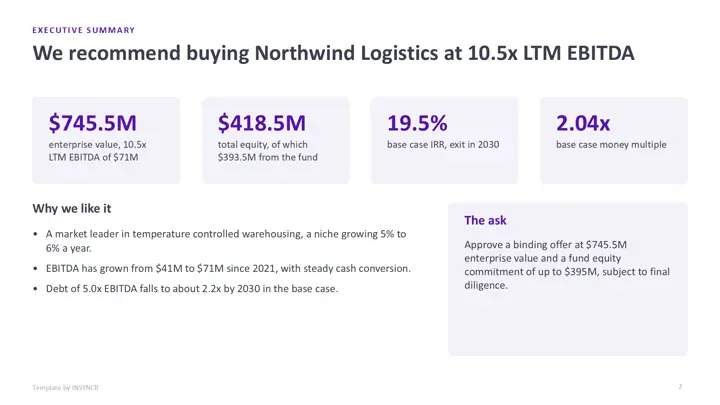
| 2 | Executive summary | Price, equity, base case returns and the exact approval asked for |
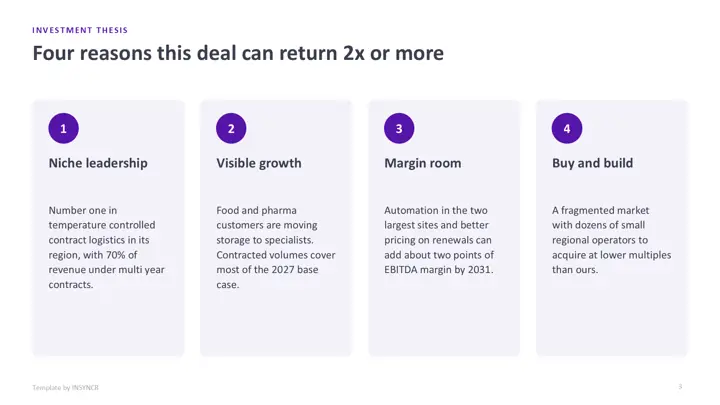
| 3 | Investment thesis | Four testable reasons to do the deal |
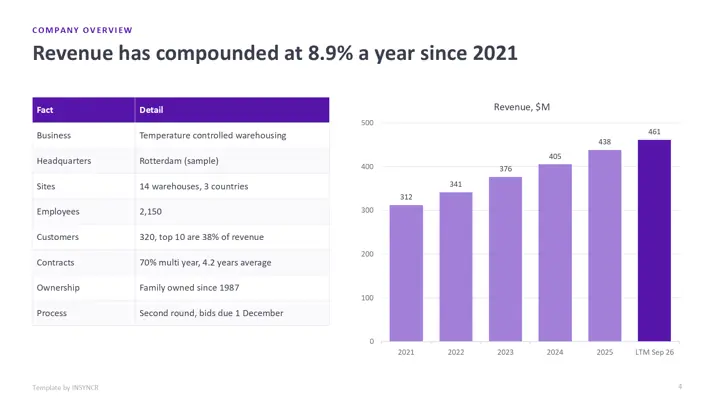
| 4 | Company overview | Key facts and revenue by year |
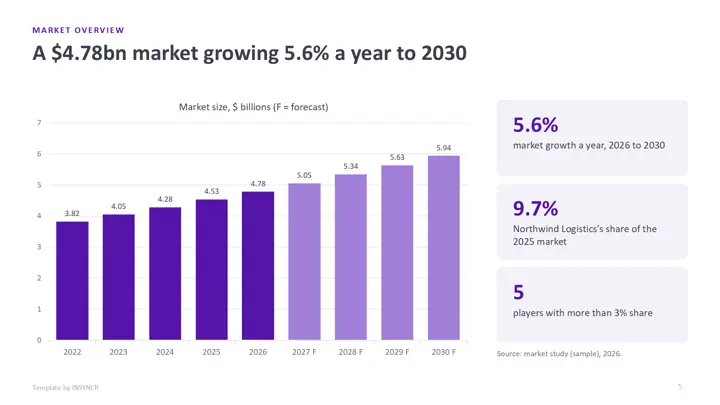
| 5 | Market overview | Market size and growth, actuals and forecast |
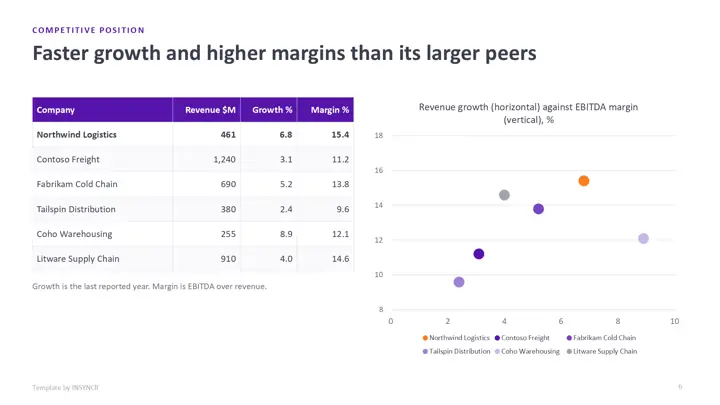
| 6 | Competitive position | Peers on size, growth and margin, with a scatter chart |
| 7 | Historical financials | Revenue, EBITDA, margins, capex and cash conversion |
| 8 | Projections | Downside, base and upside revenue and EBITDA |
| 9 | Valuation | A football field of comparables, precedents, DCF and LBO ranges against the offer |
| 10 | Returns analysis | IRR and money multiple by case and exit year, plus an exit multiple sensitivity |
| 11 | Sources and uses | Two tables that balance, and the capital structure |
| 12 | Risks and mitigants | Likelihood, impact, mitigant and how each risk shows in the model |
| 13 | Value creation and diligence | The value creation levers and the status of each diligence workstream |
| 14 | Keeping it current | How to keep the memo in step with the model |
The sample deal is Project Harbour, the acquisition of a fictional company called Northwind Logistics, and the peers are fictional too. Every figure is made up, and the deal team is shown by role only.
How do you use the template by hand?
- Download the file in the colour theme you like and open it in PowerPoint.
- Build or update your deal model in Excel: the history, the three cases, the debt package and the exit assumptions.
- Copy the figures into the tables, starting with sources and uses and the returns grid, then the executive summary.
- Update each chart: right click it, choose Edit Data, and paste your figures. For the football field, Start is the low end and Range is high minus low.
- Reread every slide title against the numbers and write the ask.
The first memo takes a day. The catch is that a live deal changes every few days: a new price, a new debt quote, a revised case, and each change means retyping the same numbers on five or six slides the night before the committee.
How do you wire it to live data with INSYNCR?
If the deal model lives in an Excel workbook, you can link the memo to it once and refresh it after every model turn instead of retyping. INSYNCR does this from inside PowerPoint.
- Install INSYNCR. It appears as a tab in the PowerPoint ribbon.
- Select a chart, table or number on a slide and link it to the matching cells in your model.
- After each change to the model, refresh. Every linked table, chart and headline number updates in place.
The template's charts and tables are native PowerPoint objects, so links attach without rebuilding any slide. INSYNCR runs in PowerPoint on Windows (Office 2016 and later), not on a Mac or in the browser. Excel works on every plan; SQL Server needs the Professional plan.
Start a free 7 day trial No credit card.
Questions about this template
What should an investment committee memo include?
Most memos carry an executive summary with the recommendation, the investment thesis, the company and its market, the competition, historical financials, projections under several cases, the valuation, returns by case and exit year, sources and uses, the main risks and the value creation plan and diligence status.
How do you make a football field chart in PowerPoint?
Use a stacked bar chart with two series: an invisible first series set to the low end of each range, and a visible second series set to high minus low. This template does exactly that, with a third series for the offer price.
Do the returns in the template add up?
Yes. Each IRR and money multiple is computed from the projections: exit EBITDA times the exit multiple, less net debt at exit, divided by the equity put in. Sources equal uses, and the equity is the balancing item.
Is the investment committee memo template really free?
Yes. There's no form, no sign up and no watermark beyond a small "Template by INSYNCR" line in the footer, which you can delete. You can use it for your own deals.