 Skip to content



What's inside the LP quarterly report template?
Fourteen 16:9 slides. Every chart and table is a native PowerPoint object you can edit, and every slide has speaker notes that explain what goes there and where the numbers usually come from.
| # | Slide | What it shows |
|---|---|---|
| 1 | Cover | Fund name, quarter end and a confidentiality line |
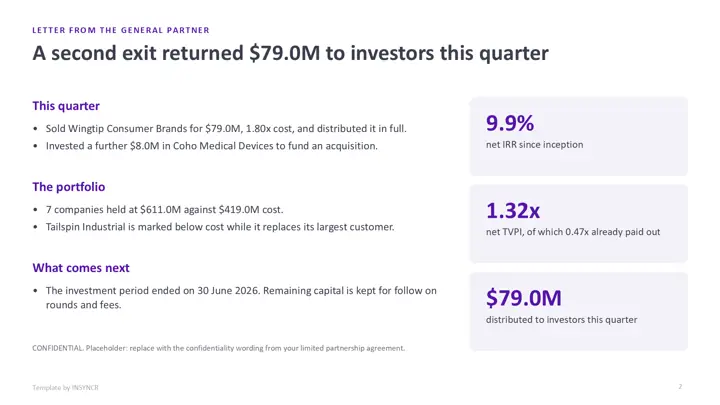
| 2 | Letter from the general partner | The quarter in a few lines, plus net IRR, TVPI and distributions |
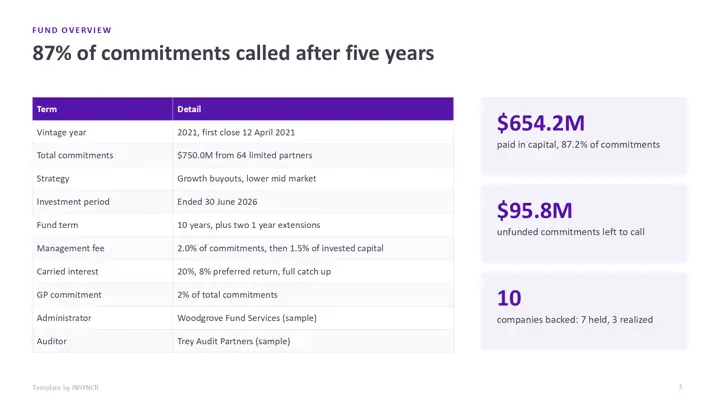
| 3 | Fund overview | Vintage, commitments, investment period, fee and carry terms |
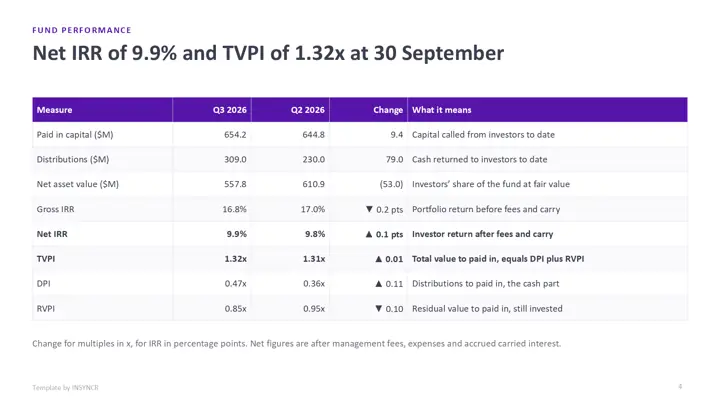
| 4 | Fund performance | Gross and net IRR, TVPI, DPI and RVPI, this quarter against last |
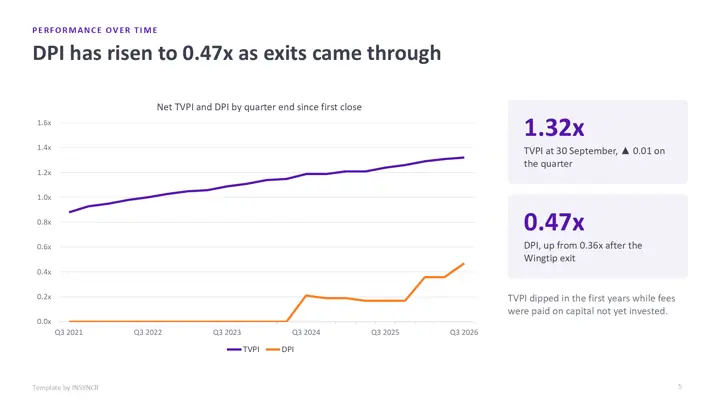
| 5 | Performance over time | TVPI and DPI at every quarter end since the first close |
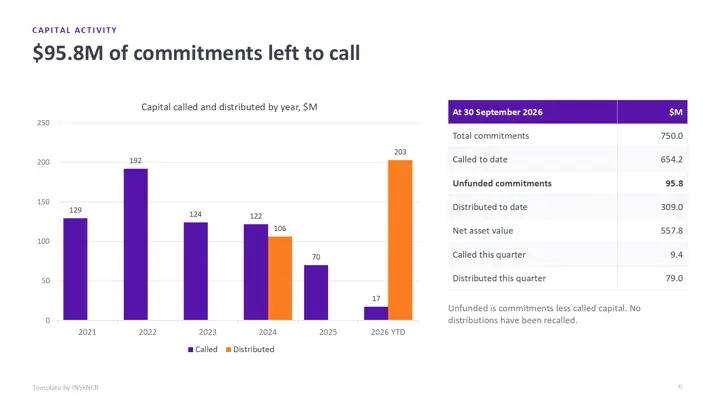
| 6 | Capital activity | Capital called and distributed by year, unfunded commitments |
| 7 | Portfolio summary | Each company with cost, realized and unrealized value, multiple, IRR and status |
| 8 | Portfolio composition | Unrealized value by sector and by region, each adding up to 100% |
| 9 | Valuation bridge | A waterfall from last quarter's NAV to this quarter's |
| 10 | Portfolio company update | Revenue, EBITDA and leverage for one company, ready to duplicate |
| 11 | Fees, expenses and carried interest | ILPA style categories for the quarter, year to date and since inception, with a disclaimer placeholder |
| 12 | Capital account statement | One investor's opening capital to closing capital, every column footing |
| 13 | ESG and outlook | Portfolio ESG measures and the pipeline |
| 14 | Keeping it current | How to refresh it by hand or automatically |
The sample fund is Acme Growth Partners III and its portfolio companies are fictional. Every figure is made up. The disclaimer and confidentiality text are placeholders for your own approved wording, not real legal text.
How do you use the template by hand?
- Download the file in the colour theme you like and open it in PowerPoint.
- Fill in the performance and capital activity tables from your fund administrator's quarter end pack. Check that TVPI equals DPI plus RVPI.
- Update the portfolio summary, then each chart: right click it, choose Edit Data, and paste your figures into the sheet that opens.
- Rebuild the valuation bridge from last quarter's NAV, and refresh the fees table and the company slides.
- Produce one capital account statement per investor: duplicate slide 12, change the name and commitment, and type in that investor's figures.
The first quarter takes a day or two. The catch is step 5: with 60 investors, that's 60 statements to type and check every quarter, and one wrong number in a statement is the kind of mistake LPs remember.
How do you wire it to live data with INSYNCR?
If your quarter end figures already live in an Excel workbook or a SQL Server table, you can link the report to them once and refresh it every quarter instead of retyping. INSYNCR does this from inside PowerPoint, and it can use variables to make many reports from one deck, which fits the one statement per investor job.
- Install INSYNCR. It appears as a tab in the PowerPoint ribbon.
- Select a chart, table or number on a slide and link it to the matching cells in Excel or the matching query in SQL Server. Set the investor name as a variable for the capital account slide.
- At quarter end, refresh. The fund slides update in place, and you produce one capital account statement per investor from the list.
The template's charts and tables are native PowerPoint objects, so links attach without rebuilding any slide. INSYNCR runs in PowerPoint on Windows (Office 2016 and later), not on a Mac or in the browser. Excel works on every plan; SQL Server needs the Professional plan.
Start a free 7 day trial No credit card.
Questions about this template
What should an LP quarterly report include?
Most quarterly reports carry a GP letter, fund terms, gross and net IRR, TVPI, DPI and RVPI, capital called and distributed, a portfolio table with cost and fair value, a NAV bridge, company updates, fees and expenses, and a capital account statement for each investor. ILPA's reporting templates are the usual reference for the fee and expense detail.
How are TVPI, DPI and RVPI related?
DPI is distributions divided by paid in capital, RVPI is the remaining NAV divided by paid in capital, and TVPI is the two added together. The template computes all three from the same figures, so they always add up.
Can I use the disclaimer in the template?
No. It's a placeholder that says the figures are sample data and not an offer. The wording on a real LP report depends on your fund documents and your market, so your legal or compliance team has to supply it.
Is the LP quarterly report template really free?
Yes. There's no form, no sign up and no watermark beyond a small "Template by INSYNCR" line in the footer, which you can delete. You can use it for your own funds.